
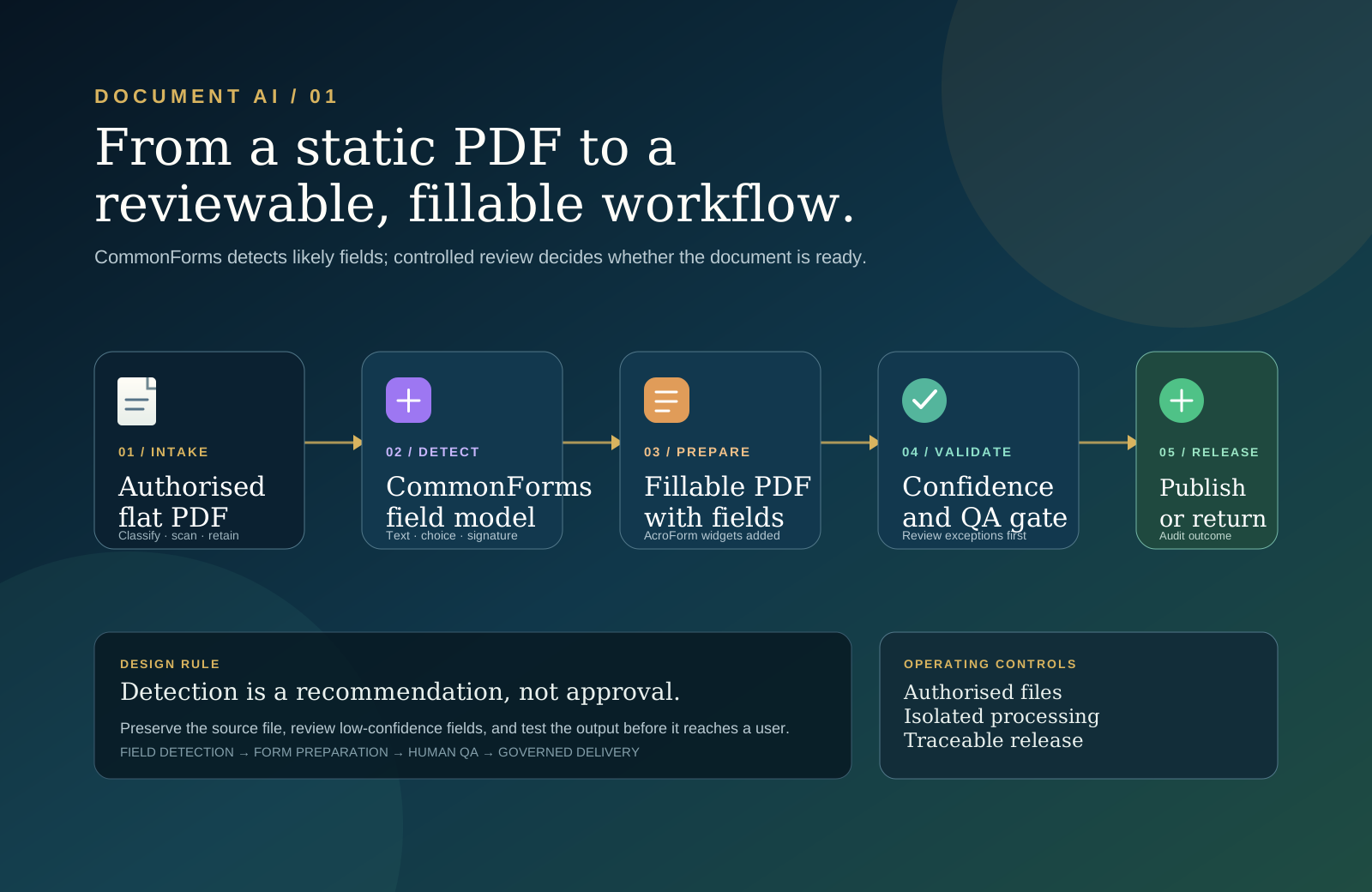
CommonForms is an open-source project for detecting likely form fields in PDFs and preparing fillable output. Its value is not that every PDF should be processed automatically. Its value is that a repetitive document-preparation task can become a fast, observable workflow with a clear review point.
The important distinction is between field detection and form readiness. A detector can identify likely text boxes, choice controls, and signature areas. It cannot, by itself, prove that a field has the right label, tab order, validation rule, accessibility semantics, retention policy, or business owner. Treat the model output as a high-quality starting point—not as an approval.
01 / The opportunity
Static PDFs create hidden operational work
Insurance claims, onboarding packs, applications, consent forms, school documents, and internal requests often arrive as flat PDFs. A person must print them, annotate them, rebuild them manually, or use a proprietary editor to place fields one by one. That friction is easy to underestimate because it is distributed: a few minutes for each document, multiplied across teams, revisions, and users.
CommonForms approaches the first preparation step as object detection. Given an image of a page, its models identify the location and type of likely text inputs, choice buttons, and signature fields. The research project was built from a web-scale corpus of fillable PDFs and released alongside the FFDNet detector family. The paper draws a useful line: detecting a field is different from enriching the form with the semantic relationship between a field and its label.
Automation is most useful when it removes repetitive placement work while preserving the human judgment required to make a form trustworthy.
A business-owned document that needs interactive fields before it can be completed digitally.
Likely text, choice, and signature locations with a confidence signal to guide review.
A validated release with an owner, audit trail, and a clear route for exceptions.
02 / Current state — 18 September 2026
The project is usable, but it remains a component—not a complete document platform
As reviewed on this date, CommonForms provides a Python package, command-line interface, open models, and the associated dataset. The public package index lists version 0.2.1, published on 26 November 2025. The GitHub release list identifies 0.2.0 as its latest tagged release and notes the addition of Apache-licensed FFDetr. Because package and release labels do not line up perfectly, a delivery team should pin and test the exact package, model, and runtime it intends to operate rather than assuming a label represents the entire stack.
The public repository also shows recent maintenance activity around help output, signature-field handling, field visibility, and duplicate detections. Meanwhile, the project’s public hosted Hugging Face Space currently reports a runtime error. That does not invalidate local use, but it is a practical reminder to treat the hosted demo as a demonstration surface—not a production dependency.
PyPI lists 0.2.1 and Python 3.10+.
The project documents FFDNet variants; the release history also notes FFDetr.
CommonForms on Hugging Face exposes a large, multilingual field-detection dataset.
Use isolated environments, pinned versions, representative test documents, and human QA.
For a current implementation view, start with the project README, the release history, and the dataset and model cards. They are the authoritative sources for supported flags and model availability.
03 / System design
Put detection inside a controlled document path
A production design should give each component one clear responsibility. The intake service owns authorisation and classification. CommonForms owns field detection and PDF preparation. A validation service owns the quality gate. A reviewer owns the release decision for exceptions. The document repository owns the final artefact and its retention policy.
Authorised PDF
  ↓
Intake: classify document → malware scan → apply retention and access policy
  ↓
Preparation worker: render pages → detect candidate fields → create fillable PDF
  ↓
Validation: inspect field count, confidence, placement, and output integrity
  ├─ passes policy → publish controlled output
  └─ fails or uncertain → reviewer corrects, approves, or rejects
  ↓
Audit record: source version → model/version → reviewer → final document ID
This division prevents a common failure mode: treating a successful model invocation as a successful business process. The workflow is successful only when the published form works for its intended audience and the organisation can explain how it was produced.
Make the document contract explicit
Before running a model, define the minimum record that travels with each request: source document ID and version, owner, classification, allowed processing region, retention period, requested output type, detector version, confidence threshold, reviewer decision, and output document ID. This turns a PDF conversion into an inspectable state transition.
Do not use a convenience endpoint as an unbounded document-upload service. Verify the caller, permitted file type, size, and classification first.
Set a threshold to prioritise review. It should not be a substitute for testing a complete, representative form.
Publish a separate output version. Preserve the original and record the transformations applied to it.
04 / Workflow
Design for a fast path and a safe exception path
The strongest workflow does not force every page through the same treatment. A clean, low-risk, high-confidence internal form may be automatically prepared and sampled for quality. A public form, regulated document, or low-confidence result should route to a reviewer before release.
1. Accept and classify the source
Receive the PDF through an authenticated service or a controlled internal workspace. Inspect its type, size, page count, ownership, and data classification. Scan it using the organisation’s standard malware controls. Decide whether it is eligible for automated preparation, needs a protected environment, or should be rejected before model processing.
2. Prepare an isolated job
Create an immutable job record and a short-lived workspace. Keep model dependencies in an isolated environment: the project’s own documentation warns that its dependency set is substantial and recommends an isolated installation. Do not allow untrusted PDFs to share a broad application filesystem, credentials, or network access.
3. Detect fields and generate a candidate form
Render the pages at a resolution suitable for the document. CommonForms then identifies candidate widgets and prepares fillable output. Use a versioned configuration for model choice, image size, confidence, whether existing fields should be retained, and whether detected signatures should be represented as signature fields. Persist those values with the job.
4. Validate the candidate before a person sees it
Run mechanical checks first: the output opens, page counts match, fields exist, fields are within page bounds, and the output has not unexpectedly removed content. Compare detected field counts against expected ranges for known templates. Flag overlaps, low-confidence fields, unusually sparse pages, or results that differ sharply from the baseline.
5. Review what the model cannot know
A reviewer confirms field labels, required status, grouping, choice options, reading and tab order, visual placement, and the expected behaviour in the target PDF viewer. For signatures, decide whether a signature widget is appropriate for the legal and operational context; a visible box is not a policy decision.
6. Release, monitor, and learn
Publish only the approved version to the authorised repository or downstream workflow. Track review corrections by template and field type. Those corrections reveal whether a model setting, a template-specific rule, or a different form-generation approach will reduce future work.
05 / Implementation
Start with a controlled proof of value
CommonForms offers both a CLI and a Python API. For an initial evaluation, use the CLI in a dedicated environment and keep the first workload narrow: one document family, a defined reviewer, a limited set of success metrics, and no automatic external release.
# Prefer an isolated environment for the dependency set
uv tool install commonforms

# Create a candidate fillable PDF, then review it
commonforms intake.pdf candidate-fillable.pdf --device cpu --confidence 0.3
The exact supported options, defaults, and model names should be taken from the version you install. The project documentation currently describes model selection, CPU or CUDA device selection, image-size and confidence controls, preservation of existing fields, optional signature fields, and a faster CPU mode. Pin that toolchain in a lockfile or container image before moving beyond a local evaluation.
What to measure
- Field recall. How many expected fields were found? Measure text, choice, and signature fields separately.
- False placements. How often did the workflow create a field over a rule, table line, decorative element, or incorrect area?
- Review effort. Record the time to inspect and correct a candidate compared with manual preparation.
- Completion success. Test whether real users can fill, save, re-open, and submit the output in the viewers they actually use.
- Accessibility readiness. Check keyboard navigation, labels, reading order, and assistive-technology behaviour independently of detection accuracy.
- Exception rate. Track the share of jobs sent to review and the reasons. A low rate is useful only when quality remains high.
06 / Validation and controls
Do not confuse a fillable PDF with an accessible or compliant form
CommonForms addresses form-field detection and preparation. The research explicitly separates that from form enrichment: determining how widgets relate to labels and higher-level form structure. That gap matters in practice. A form can have correctly placed widgets and still be hard to navigate, ambiguous to complete, inaccessible to a screen reader, or unsuitable for a regulated workflow.
Build controls around the use case. A low-risk internal request may need visual review and functional testing. A customer-facing or regulated form may require legal approval, accessibility assessment, template ownership, version control, and a documented release process. The stricter path should be a normal branch in the workflow, not a manual workaround invented after a failure.
Keep access scoped, encrypt stored files, set retention, and avoid sending sensitive documents to services that are not approved for their classification.
Use isolated workers, constrain parsing resources, and keep processing identities separate from systems that publish or send documents.
Verify labels, order, keyboard operation, and saved output. Detection boxes alone do not establish accessible semantics.
Record source, configuration, output, quality checks, reviewer, and release time without storing more sensitive data than necessary.
07 / Rollout
Choose one repeatable form family before scaling
Begin with a stable, low-risk PDF template that has enough volume to expose real value. Prepare a small, consented evaluation set that includes clean examples, imperfect scans, different page layouts, and documents with known edge cases. Set an acceptance policy before you run the test: what accuracy is good enough, which errors require human review, and who has authority to publish the result?
If the proof of value reduces preparation time without creating hidden correction work, expand carefully. Add template-aware rules where they are justified, keep the raw detector output available for debugging, and make every new document class earn its automation level. The goal is not maximum autonomy. It is a dependable path from a document someone owns to a form someone can use.
Final rule. Use CommonForms to accelerate the first draft of a fillable PDF. Use workflow design, validation, and accountable review to make that draft safe to rely on.
Sources
Primary references
CommonForms project repository · CommonForms research paper · Python package listing · Dataset card · Release history
Stay up to date
Get new engineering notes by email.
Occasional, practical writing on engineering, automation, data, and product strategy.