
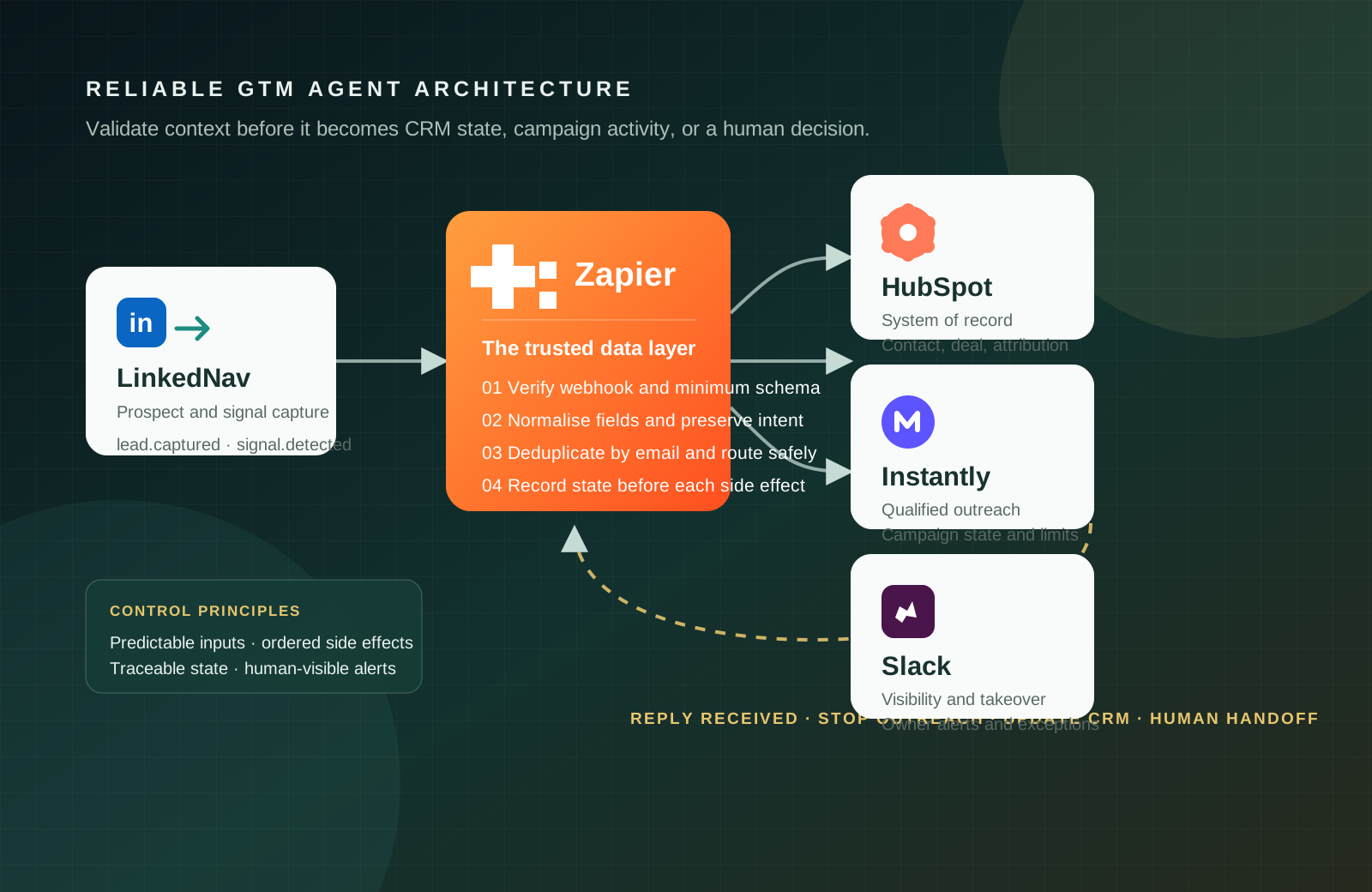
GTM agents become dependable when their inputs are consistent, their state changes are observable, and their actions are safe to reverse.
In this architecture, LinkedNav is the LinkedIn-facing ingress layer. It turns a prospect captured through a Chrome export, a relevant social interaction, or a reply into a machine-readable event with identity, profile, company, and signal context. LinkedNav supplies the evidence; Zapier decides whether that evidence is complete and safe enough to change downstream state.
01 / The principle
Reliable execution starts before an agent makes a decision
LinkedNav bridges human activity on LinkedIn and the operational systems behind a GTM motion. It can capture prospect records and engagement signals at the point where context is richest, then pass that context into a controlled workflow instead of forcing an operator to re-enter it manually. In this pattern, LinkedNav remains responsible for ingress and source context; it does not silently own qualification, CRM truth, or campaign policy.
A LinkedNav event is valuable, but it is not yet a trusted record. Zapier sits between signal capture and downstream systems, turning external events into validated, consistently mapped actions. HubSpot retains the customer and pipeline record; Instantly performs outreach only after qualification; Slack makes exceptions and ownership visible.
Capture prospect records and engagement context such as a relevant interaction or reply.
Validate, normalise, deduplicate, route, and record workflow state before side effects occur.
Resolve the contact, preserve attribution, and create pipeline state when the signal qualifies.
Run a governed campaign and give the owner an auditable, human-visible operating surface.
Good GTM automation is less about speed than about trustworthy state transitions.
02 / Architecture
Give each system one clear responsibility
Separating the responsibilities keeps the flow understandable. LinkedNav detects activity or captures prospects. Zapier receives the event and prepares trusted fields. HubSpot resolves the contact and pipeline state. Instantly enrols only qualified leads. Slack alerts the owner when a person needs awareness or control.
LinkedNav event
  ↓
Zapier: authenticate → validate → normalise → deduplicate → route
  ↓
HubSpot: find or create contact → preserve source and intent
  ↓
Instantly: enrol only when qualification policy permits
  ↓
Slack: notify owner, exceptions, and takeover
  ↓
Reply received: stop outreach → update CRM → return conversation to a human
The result is a small state machine rather than a chain of loosely connected integrations. Every event has an owner, each meaningful side effect happens in order, and the current state can be inspected when an exception occurs.
03 / Technical contract
Interactive architectural block: technical data and state contract
This contract makes every boundary explicit: what activates a layer, what that layer may do, what it emits, and which business state is allowed to change. Expand or collapse the block as you read, and follow each row from ingress to human takeover.
Interactive architectureTechnical data & state contractSix controlled state transitions
| System / Step | Input Event | Layer Responsibility | Output Payload / Action | State Mutation |
|---|---|---|---|---|
| LinkedNav (Ingress) | Social comment or Chrome export | Captures LinkedIn profile and signal metadata | POST https://hooks.zapier.com/… | Ingress event generated |
| Zapier (Steps 1–2) | Raw webhook POST | Validates work-email presence and format | Filtered JSON payload | Schema validated |
| HubSpot (Steps 3–4) | Validated payload | Deduplicates by email, upserts the contact, and creates the deal | contact_id, deal_id | CRM record updated |
| Instantly (Step 5) | Upserted contact | Enrols the contact with mapped signal variables | Campaign enrolled | Outreach active |
| Slack (Step 6) | Campaign-enrolled event | Formats an interactive card in #outbound-signals | Channel notification | Sales alerted |
| LinkedNav → Zapier (Reverse) | reply.received webhook | Detects a prospect response on LinkedIn | Instantly.pause() + HubSpot.update() | Campaign paused / SQL set |
Define the minimum record before building the Zap
A reliable workflow should stop or branch when essential data is absent. The minimum payload is email, first name, last name, company, job title, LinkedIn profile URL, signal type, and signal details. Decide explicitly whether missing information should halt processing, route to enrichment, or raise a review task.
{
  "event": "signal.detected",
  "lead": {
    "first_name": "Amina", "last_name": "Dlamini",
    "email": "amina@example.com",
    "job_title": "Revenue Operations Lead",
    "company": "Example Co",
    "linkedin_url": "https://linkedin.com/in/example",
    "signal_type": "engaged_with_post",
    "signal_details": "Viewed AI automation workflow post"
  }
}Use email as the match key for CRM resolution and duplicate protection.
Map stable properties that support segmentation and account context.
Preserve why the record entered the flow for personalisation and reporting.
Validate upstream. Instantly should never be the first system to discover that a lead is incomplete. It should receive only records that have passed the required checks and qualification policy.
04 / Implementation
Build the primary path, then design the reverse path
1. Capture and gate the event
Create a Zap with Webhooks by Zapier - Catch Hook, then subscribe LinkedNav to the events the workflow needs, such as lead.captured, signal.detected, and reply.received. Verify the webhook signature where available, retain an event ID, and use a filter to continue only when the email exists and is structurally valid.
2. Normalise before routing
Map external field names into stable internal names. Standardise names, company, title, LinkedIn URL, and signal fields. Use signal type, geography, or ICP segment to select the intended campaign path, and retain the original signal detail for later agent decisions and reporting.
3. Resolve CRM state first
Use HubSpot’s Find or Create Contact action with email as the match key. Map identity, company, title, profile URL, and LinkedNav attribution. For high-intent events, create an associated deal only after the contact resolution succeeds. This avoids a campaign or deal becoming detached from the record that explains it.
4. Enrol the qualified lead
Make Instantly the next action only after the contact and qualification state are known. Select a campaign aligned to the signal and ICP, pass identity fields, and map lead.signal_details and lead.linkedin_url into campaign variables. Enable duplicate protection or skip logic where it is available.
5. Close the loop on a reply
Create a reverse Zap for reply.received. It should stop or mark the Instantly sequence as replied, update the HubSpot lifecycle state, and notify the owner in Slack. A reply is not a new marketing input: it is a signal to end redundant automation and return the conversation to a person.
05 / Production controls
Make the data path observable before you scale it
- Use an idempotency key. Store the source event ID or a deterministic key so retries update the same record instead of enrolling the lead twice.
- Separate detection from execution. Let LinkedNav capture, Zapier govern, HubSpot record, and Instantly execute. Do not let one tool silently own every decision.
- Protect deliverability. Use verified sending domains, campaign limits, conservative sequencing, and duplicate protection before enabling a new path.
- Test one controlled record. Confirm field mappings, CRM state, campaign variables, notifications, and the reply stop condition before production rollout.
- Keep a human-visible exception path. Send missing data, uncertain routing, high-intent signals, and replies to the accountable owner with the signal context attached.
- Measure the quality of state. Track rejected payloads, duplicates prevented, campaign enrolments, reply stop events, and time from signal to human follow-up.
06 / Final rule
Reliability comes from state control, not tool count
The strongest GTM stack is not the one with the most automated actions. It is the one that prevents low-quality events from propagating, makes every state change inspectable, and stops at the right moment. Keep the workflow simple enough to debug, observable enough to trust, and strict enough to keep people in control of consequential conversations.
Stay up to date
Get new engineering notes by email.
Occasional, practical writing on engineering, automation, data, and product strategy.